
Holiday & accrual
Fixed allowance or 12.07% accrual under reg 15B, days or hours, pro-rata for part-timers, bank holidays, year-end carry-over, fit notes and one approval inbox.
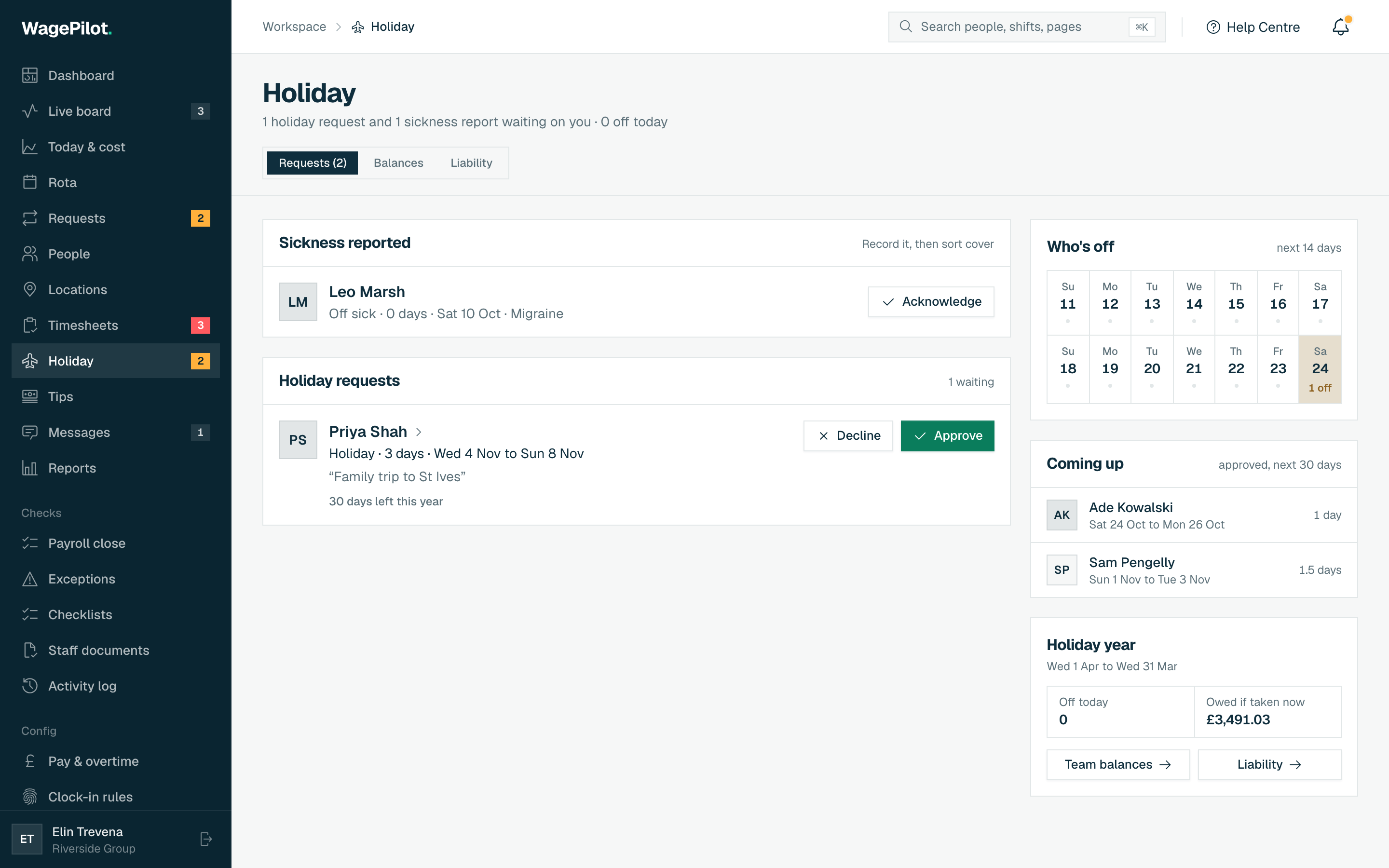
Holiday turns the most spreadsheet-prone part of running a team into taps. Staff see their balance and request leave from their phone; you approve or decline from a single inbox that warns you about rota clashes; and accrual is calculated for you, including the rules that trip people up.
How UK holiday is calculated
Most UK workers are entitled to 5.6 weeks of paid holiday a year: 4 weeks under the Working Time Regulations 1998 reg 13 plus 1.6 weeks under reg 13A, together capped at 28 days (reg 13A(3)). WagePilot tracks each person’s entitlement and balance, and handles the cases that are easy to get wrong:
- Regular part-timers
- Entitlement is pro-rata to the days they work: set “Days worked per week” and 28 × 3/5 = 16.8 is worked out for you. Entitlement is rounded up, never down.
- Mid-year starters
- A fixed allowance is pro-rated from their start date and rounded up to the half day, never down.
- Irregular-hours & part-year staff
- For leave years starting on or after 1 April 2024, holiday accrues at 12.07% of hours worked (WTR 1998 reg 15B). WagePilot applies this automatically as hours are logged.
The reg 15B rules WagePilot applies
- Rounding (reg 15B(5))
- A fraction of an hour under 30 minutes counts as zero, and 30 minutes or more counts as a whole hour. WagePilot rounds the year’s running total, not each pay period, so nobody loses up to 29 minutes a week.
- 28-day cap (reg 15B(4))
- Accrual in a leave year stops at the statutory maximum of 28 days (5.6 of the worker’s own weeks). When the cap is reached the staff app tells them, and anything already earned is still theirs to take. Leave carried in from last year sits on top of the cap.
- Statutory leave
- Whole weeks off sick or on family leave still build holiday at 12.07%, so nobody loses holiday for being off sick.
Choosing a holiday basis
You set each person’s holiday when you add or edit them (org defaults for rate, allowance and pay method live in Settings). The first choice is the basis, which changes the fields you see:
- Fixed allowance
- A set entitlement for regular staff. Choose whether it’s in Days or Hours (hours suit shift workers, e.g. 20h/wk × 5.6 = 112h/yr).
- Accrual (12.07%)
- For zero-hours and irregular staff: holiday builds at 12.07% of the hours they actually work, so you never reverse-engineer it from a spreadsheet.
Fixed-allowance options
- Days worked per week
- Pro-rates a part-timer’s allowance (28 × 3/5 = 16.8 days).
- Allowance builds
- All up front makes the full allowance available from day one; Monthly accrual releases 1/12 each month.
- Holiday pay
- How leave taken is paid: 52-week average earnings (for variable pay) or a fixed contractual rate.
Bank holidays: in or on top of the allowance
Nothing in the Working Time Regulations gives a worker the right to have bank holidays off, and the 5.6 weeks can include them. Whether they come out of the allowance is up to your contracts, so it is a setting under Settings → Bank holidays and carry-over (owner only):
- Included in the allowance (default)
- Staff book a bank holiday off like any other day, and it comes out of their allowance.
- On top of the allowance
- Bank holidays are given on top. Part-timers get a pro-rata share (bank holidays × their days ÷ the full-time week), whichever days they work, so a Monday worker and a Wednesday worker on the same hours are treated alike, as the Part-time Workers (Prevention of Less Favourable Treatment) Regulations 2000 require.
Carrying in a balance
On accrual basis you can enter Holiday already accrued (hours): leave earned before WagePilot (from onboarding or switching a worker over). It’s credited to the current leave year on top of what they accrue here. On an hours allowance you can also enter Holiday already taken this year (hours) so their balance starts from the right place.
Carrying leave into the next year
Set your rules under Settings → Bank holidays and carry-over, then close each leave year on the Year end tab of Holiday. The defaults follow the Working Time Regulations:
- The 4 weeks under reg 13 carries over only when sickness (to be used within 18 months of the end of the leave year), family leave, or your failure to give a fair chance to take it stopped the worker taking it (reg 13(14) to (17)).
- The 1.6 weeks under reg 13A carries over only by agreement (reg 13A(7)), or after family leave (reg 13A(7A)). Set Carry-over agreement (weeks) between 0 and 1.6; 0 means it is lost if not taken.
- Extra contractual days that carry over covers leave above the legal minimum. 0 means none.
- Irregular-hours and part-year workers follow reg 15D: family leave, sickness or your failure carry it all; otherwise only the agreed part.
-
01
Open Year end
On Holiday, choose the Year end tab once a leave year has ended. Each person shows what is unused, what carries and what is lost.
-
02
Tick any reason
If a worker could not take their leave, tick Off sick, Family leave or No fair chance. Each lets more carry, under the rule that keeps it longest.
-
03
Carry it over
Tap Carry X over to save it. Leave is used in this order next year: carried-in leave first, then the 4 weeks, then the 1.6 weeks, then contractual days. Only the account owner can save carry-over.
The approval flow
-
01
Staff request
They pick dates in the app; their remaining balance is shown so they request realistically.
-
02
You see a clash check
The request lands on the Requests tab, flagged if it collides with a shift they’re rota’d for.
-
03
Approve or decline
One tap. Approved leave updates their balance and shows on the rota so you don’t schedule over it. See Holiday approvals & balances.
Sickness and fit notes
When staff report sickness it appears under Sickness reported on the Requests tab, so you can record it and sort cover. Under the Statutory Sick Pay (Medical Evidence) Regulations 1985 reg 2(2), the first 7 calendar days of a spell of sickness are self-certified: you cannot ask for a fit note for them. Back-to-back sick requests count as one spell.
- The Fit notes card (owner only) lists each spell of more than 7 days from the last 90 days, the date a fit note is needed from, and whether one is On file or Needed.
- Staff upload their fit note from the Holiday screen of their app, and you can upload one on their behalf with Upload fit note.
- A fit note is health data under UK GDPR, so only the account owner and the worker can see it. Managers never do. Each file opens through a link that lasts 60 seconds.