
Rota builder
Build the week on a drag-and-drop grid, copy last week, get conflict, working-time and holiday-clash warnings, then publish so staff see shifts instantly.
The rota is a week grid: people down the side, days across the top. You drag shifts in, the builder warns you about clashes and working-time breaches, and you publish. Staff are notified on their phones the moment you do. This page walks every button on it, from the top bar down to the cost row under the grid.
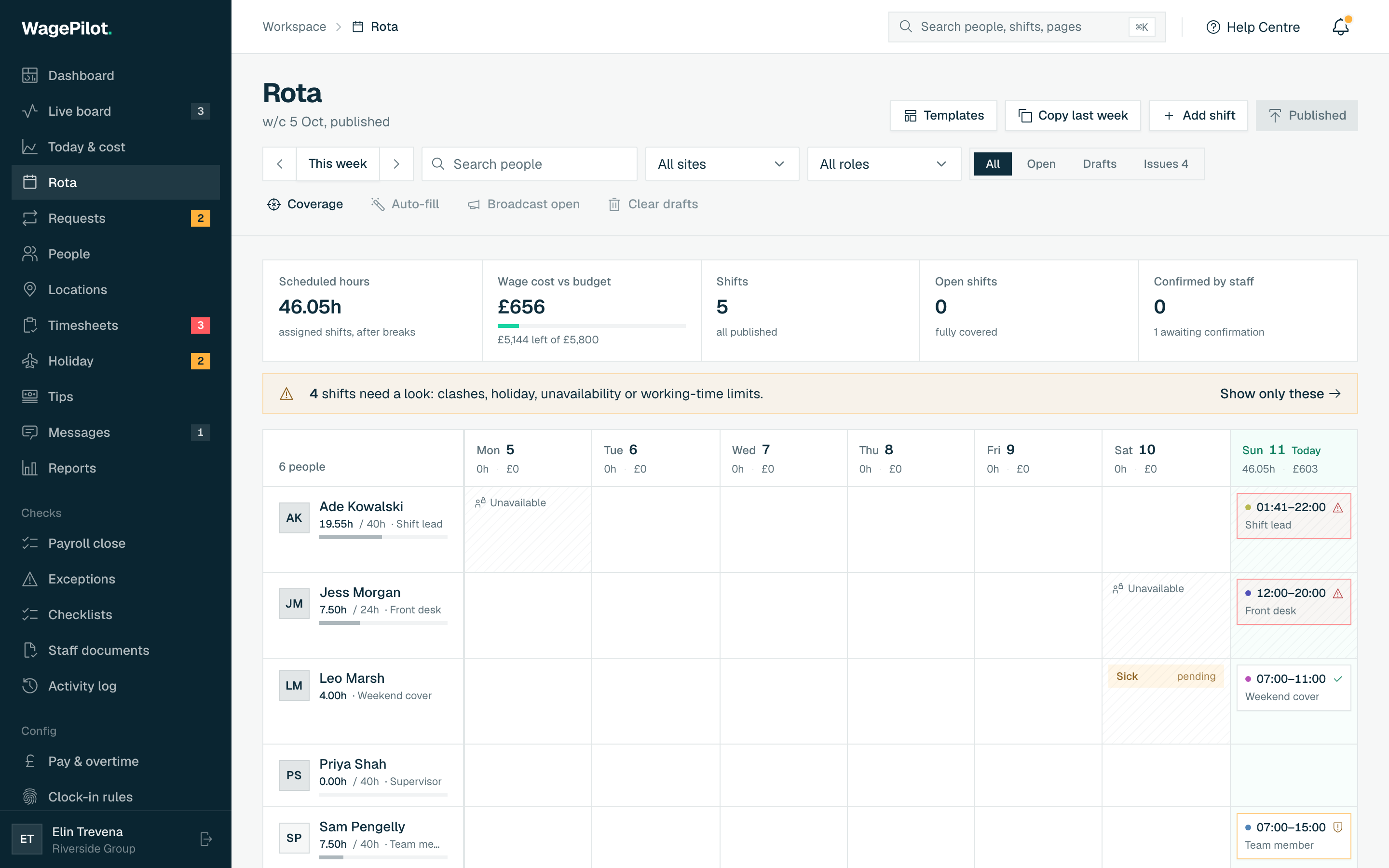
The top bar and week summary
The header shows the week you are viewing and four buttons; under it, four cards summarise the week (they respect the site filter if you set one).
Header buttons
- Coverage
- Opens the Coverage & budget window to set how many people each site needs per day and a weekly wage budget.
- Templates
- Save the current week as a reusable template, or drop a saved one onto this week.
- Copy last week
- Copies the previous week’s shifts onto this week as drafts to adjust. Most weeks rhyme.
- Publish (n)
- Publishes every draft in the view and notifies staff. The number in brackets is how many drafts are waiting.
The four summary cards
- Scheduled hours
- Total paid hours rota’d this week (shift length minus breaks), assigned shifts only.
- Wage budget / Est. wage cost
- If the site has a weekly budget, shows projected cost against it (over / near / left). With no budget it just shows the estimated wage cost if the rota runs as planned.
- Shifts
- How many shifts are assigned, with a note of how many are still draft or that all are published.
- Open shifts
- Shifts with no name on them yet: “need a name”. Turns amber while any are open.
Moving around the week
- Arrows (‹ ›)
- Step back or forward one week at a time.
- This week
- Jumps back to the current week. Only appears once you’ve paged away.
- Site filter
- When you have more than one site, choose “All sites” or a single site. The grid, summary cards, coverage and cost rows all narrow to that site.
Building a week fast
-
01
Copy last week
Start from a typical week as a template and adjust, rather than building from blank. Copied shifts land as drafts.
-
02
Add or drag shifts in
On desktop, click an empty cell to add a shift, or drag an existing shift to another day or person. Drop it on the Open shifts row to unassign it.
-
03
Watch the warnings
The builder flags double-bookings, working-time breaches and shifts that clash with booked holiday before you commit.
-
04
Publish
One click publishes the week and notifies staff instantly. Changes after publish re-notify only the people affected.
Adding and editing a shift
Clicking a cell (or a shift) opens the shift editor. Quick-fill chips set common patterns in one tap, then everything else is a field.
What each control does
- Quick fill
- One-tap presets (Open 07:00–15:00, Mid 10:00–18:00, Close 15:00–23:00, Day 09:00–17:00) that set start, end and break together.
- Who
- Who works it. Leave as “Open shift (anyone can claim)” to create an unassigned shift. If the person isn’t assigned to that site you’re told, but they can still clock in there for this shift.
- Site
- Which location the shift is at. Required. You can’t save without one.
- Date / Start / End
- When it runs. If the end time is earlier than the start (e.g. 22:00 → 02:00) it’s treated as overnight and rolls into the next day automatically.
- Break (min)
- Unpaid break minutes, subtracted from paid hours and the cost estimate.
- Role
- The job for the shift (e.g. Supervisor). Roles that have their own pay rate appear as chips to pick from, or type any role.
- Sleep-in shift
- Optional toggle for a shift where the person may sleep on site. It is costed at a flat allowance (defaulting to the one in Pay settings); time woken to work is clocked and paid at their normal rate.
- Notes
- Optional. Shown to the team member with the shift, e.g. “cover the delivery at 11”.
The footer has Cancel, Add / Save, and, when editing an existing shift, a Delete. Deleting a shift someone has already clocked into asks you to confirm: the rota entry goes but the clocked time stays on the timesheet.
The warnings a shift can show
As you fill the editor, coloured panels appear underneath for anything worth a second look. Red is a hard problem, amber is a heads-up.
- Conflict (red)
- The person is already rota’d at that time, or the shift lands on their booked or pending leave.
- Working Time check (amber/red)
- Rest-break, daily-rest or weekly-hours issues under the Working Time Regulations. A red dot is a breach you’re asked to review; amber is a caution.
- Unavailable (red)
- The person marked themselves unavailable then. You can still roster them, but you’ll see it.
- Preferred (green)
- A time they said they’d prefer to work.
- Compliance
- A required document (e.g. right to work) is missing, expired or expiring. If your org is set to block, you can’t roster them until it’s resolved on their profile.
Reading the grid
- Each shift chip shows its time and role; draft shifts are grey, published ones green.
- A shift with a shield icon has a working-time caution; a triangle means a conflict or a hard breach.
- The Open shifts row at the bottom holds every unassigned shift: drag a name’s shift here to unassign it, or a chip from here onto a person to assign it.
- A compliance chip next to a name (Docs missing / expired / expiring) flags a worker whose required documents need attention; hover it for the detail.
- Anyone on booked leave shows a Holiday tag in that day’s cell.
Coverage, cost and wage-% rows
Three summary rows sit under the grid so you can read the week’s shape at a glance.
- Coverage
- Per day: “Covered”, or “n short” in red where a site’s demand targets aren’t met. Shows a dash on days with no target set.
- Day cost (est.)
- The projected wage cost of each day’s assigned shifts.
- Wage % of sales
- Only when a single site is in scope and you track takings: type each day’s expected sales and see labour as a percentage of it, toned green/amber/red. The figure is shared with Today & cost.
Filling open shifts
The toolbar under the week nav has three bulk tools for open and draft shifts. Auto-fill and Broadcast are disabled when there are no open shifts; Clear drafts is disabled when there are no drafts.
- Auto-fill (n), on Pro
- Assigns open shifts to eligible, available staff automatically, respecting availability, booked leave, site assignments, working-time breaches and (if you block on it) compliance. Tells you how many it filled and how many still need a name.
- Broadcast
- Offers the week’s open shifts to eligible staff to claim from their app. Claims come back to you on the Requests page for a final yes. On every plan.
- Clear drafts
- Deletes this week’s draft shifts after a confirm. Published shifts are untouched. On every plan.
Publishing and confirmations
Publishing is what makes a rota real to staff. A draft you’re still editing is invisible to them. Publish notifies everyone on the week; later edits re-notify only the affected people.
- If any published shift carries a working-time breach, publish still goes through but tells you how many to review.
- A strip above the grid shows how many published shifts staff have confirmed versus how many are awaiting confirmation, so you can see who has actually seen their week.
Coverage targets & wage budget (Pro)
The Coverage button opens a window where you tell each site how many people it needs, and set a weekly wage budget. The grid then flags short days and the summary card tracks spend against budget. Setting and editing these needs Pro: below it the window still opens and explains itself, and any targets and budget you have already saved are shown read-only rather than disappearing.
-
01
Pick the site
Choose which location you’re setting demand for.
-
02
Set a weekly wage budget
Optional. Enter a pound figure to get live over/under variance on the rota; leave blank for no budget.
-
03
Add demand bands
Add a band per requirement, e.g. “Mon 09:00–17:00, 2 people”. Leave the role blank for “any role”, or name one to require that role.
-
04
Save demand
Save writes it to the site. Empty or zero-headcount bands are dropped automatically.
Rota templates
-
01
Save this week
Open Templates, name the week (or accept the default) and Save. It captures this week’s shifts.
-
02
Apply to any week
Page to the target week, open Templates and tap “Apply to <week>”. The template drops in as draft shifts.
-
03
Delete
Remove a template you no longer use with the bin icon.
On a phone
The seven-column grid and drag don’t fit a phone, so on mobile the rota becomes one day at a time: a day picker across the top (with a shift count per day), that day’s shifts as a tappable list, an “Add shift” button, and an “Off today” line for anyone on leave. Tap a shift to open the same editor. Changing the person or date there moves or reassigns it, no drag needed.