
Live board
Who is clocked in at every site, what each person is earning, overtime and late alerts, clocking someone out, and your live labour cost.
The live board is your control tower. It shows, in real time, who is clocked in across all your sites, what each person is earning so far, and a running £/hr labour cost for the whole floor. It is the answer to "what is happening right now, and what is it costing me?".
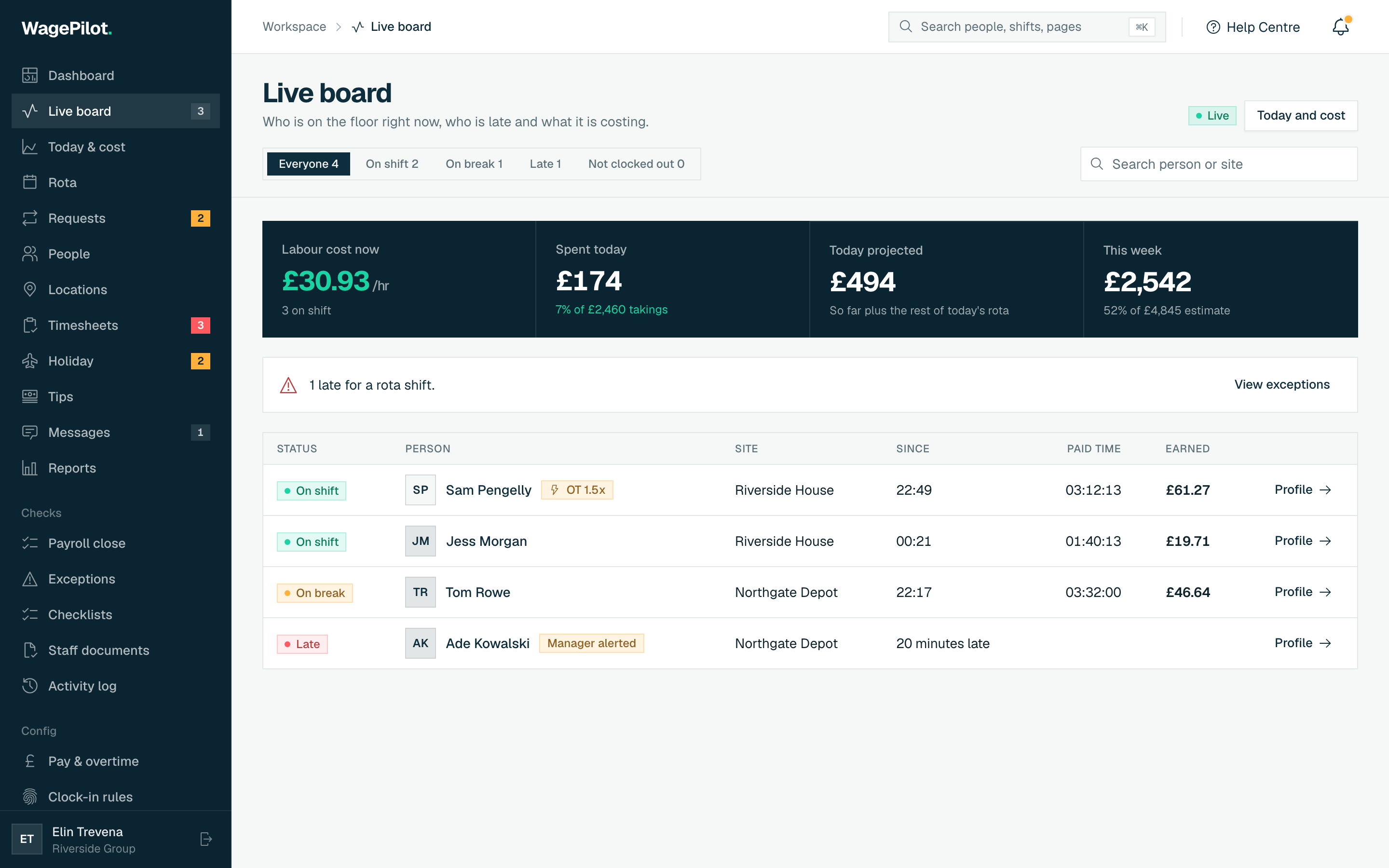
The four cost cards
- Labour cost now
- The summed £/hr of everyone currently on the clock, with how many are on shift. Unpaid breaks are excluded, so it reflects what you are actually paying for.
- Spent today
- What today’s shifts have cost so far, ticking live. If takings are entered for today it also shows labour as a percentage of them.
- Today projected
- Spent so far plus the rest of today’s rota.
- This week
- Spend this pay week to date, against an estimate for the whole week if the rota runs as planned.
If a manager’s role has pay hidden, the board still shows who is in, but money figures are withheld.
Who’s in
Below the cards is a list of everyone the board knows about right now. Filter it with the chips at the top (Everyone, On shift, On break, Late, Not clocked out), search by name or site, or group it by site. Tap a row to open that person’s profile.
- On shift
- Clocked in and working. Shows when they started, paid time so far and estimated earnings.
- On break
- On an unpaid break: earnings pause, so the cost figures don’t count them.
- Late
- Has a published rota shift that started more than five minutes ago with no clock-in. Only shown when shift scheduling is on.
- Not clocked out
- Clocked in more than 16 hours ago and never clocked out. These are kept out of every cost figure so a forgotten clock-out doesn’t inflate today’s spend.
- OT badge
- An “OT ×n” tag appears when someone crosses a daily or weekly overtime threshold, and their estimated earnings switch to the overtime rate.
- Row warnings
- A chip flags someone who is past their shift end, clocked in longer than your maximum shift length, or over their allowed break.
Clock someone out
An owner or manager can clock a person out straight from the board, for example when they left and forgot to clock out. Every working, on-break or not-clocked-out row has a Clock out button.
-
01
Tap Clock out
A dialog opens showing when they clocked in. If they are on a break, the break is closed at the same time.
-
02
Set the finish time
Pick when they actually finished. It can’t be in the future or before they clocked in. For a forgotten clock-out there is no default, so you must choose the real time.
-
03
Give a reason
Write at least 5 characters (up to 500). The worker is shown the reason and it is kept in the activity log.
-
04
Confirm
Press Clock out. Pay for the shift is worked out again from the new finish time.
Late and attendance alerts
When anyone is late for a rota shift or has not clocked out, a banner on the board says so, with links to Exceptions and to close the shift in Timesheets. You can dismiss it until something changes.
Separately, WagePilot checks every few minutes, even with the board closed, and notifies owners and managers (including by push) when someone is late past the grace period, overruns their shift, or takes a long break. Each alert is sent once. Turn each alert on or off and set its grace period under Clock-in rules.