One app for the whole shift
Rota, clock-in, holiday, timesheets and a live labour-cost board: the essentials a small UK team needs, with nothing bolted on to inflate the bill.
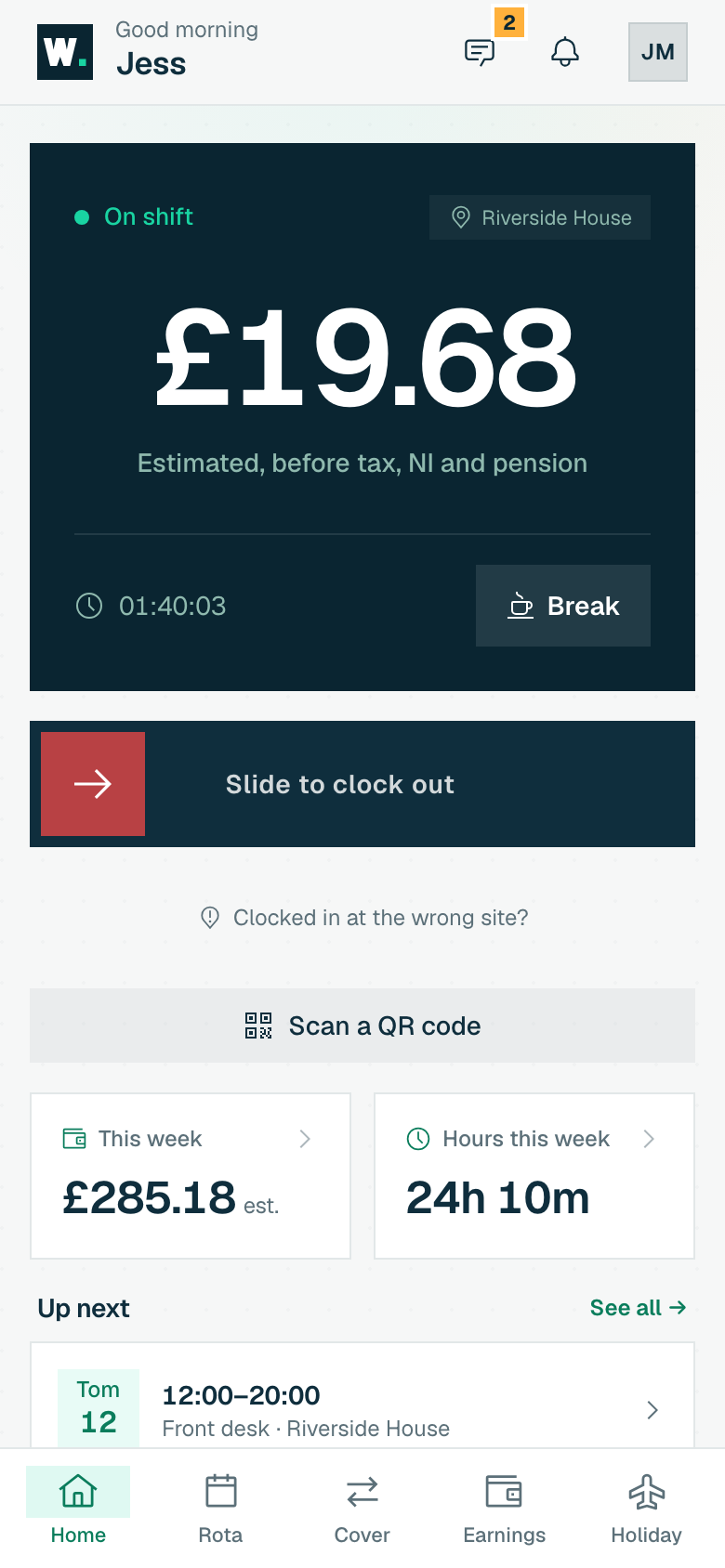
Geofenced clock-in
Staff clock in from their own phone. WagePilot checks GPS once, only at the moment they clock in or out, to confirm they are actually on-site. Where signal is poor, a printed QR code by the till gives them an obvious way in, and that punch is geofenced too whenever the phone can give a position. Nothing to buy: nobody needs a shared tablet, because everyone already has a phone. If you would rather have one clock on the counter, Kiosk mode runs on a tablet you already own.
- Location checked only at clock-in/out, never continuously tracked
- Per-site geofence radius you set with a pin on a map
- Printed QR codes, or a kiosk on a tablet you already own
- Opening, closing and other checklists for any kind of site, working offline, with tamper-proof records you can print
- Site access: encrypted entry and alarm codes shown only to the right staff, with a reveal log and a key register
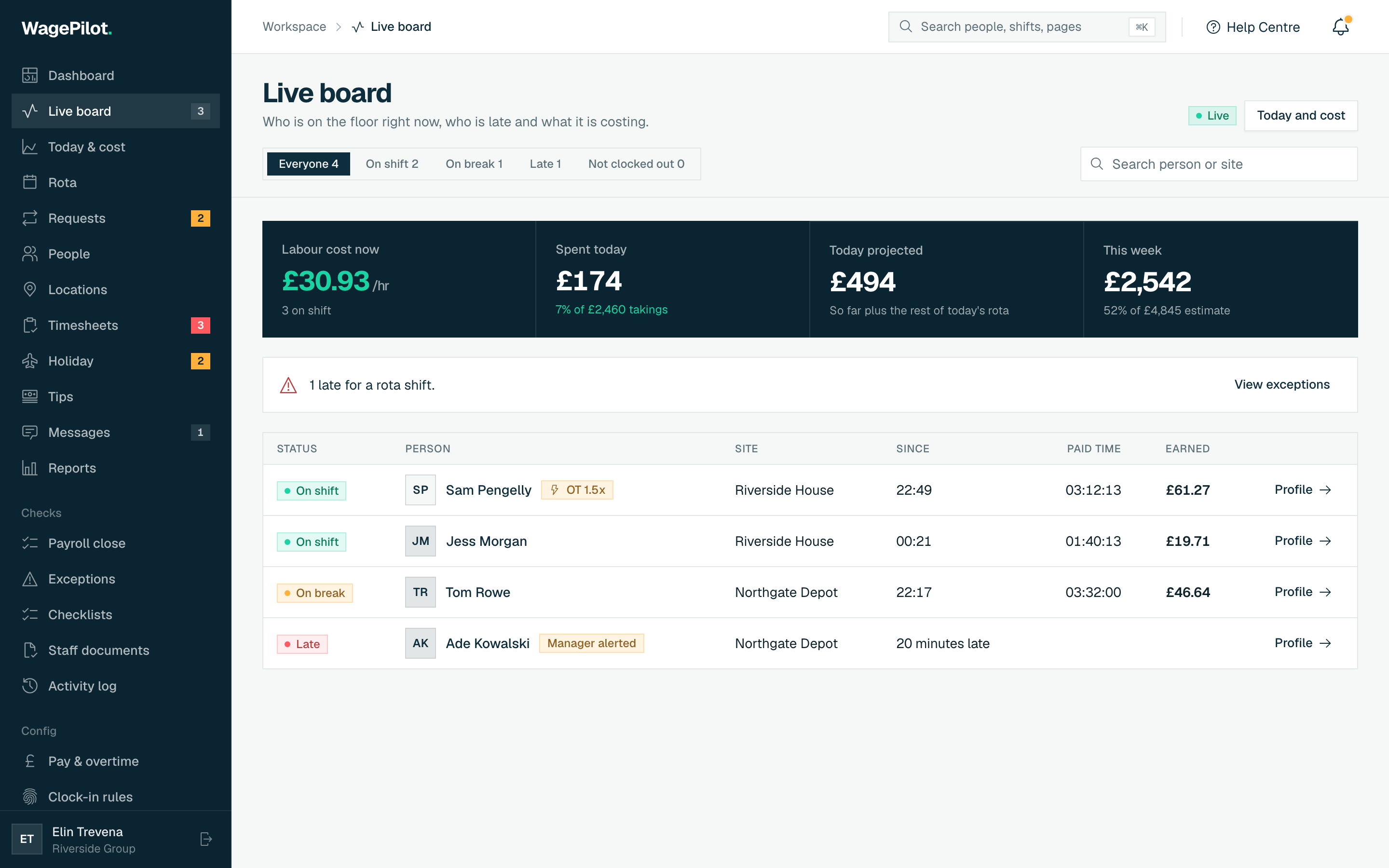
Live labour cost
The owner board shows a live, ticking total of what your floor is costing this minute, summed from the rate of everyone currently clocked in. See an over-staffed Tuesday at 2pm and send someone home before it becomes money already spent, not a surprise on the payroll run.
- Live £/hr burn rate across every site at a glance
- Projected day total against your budget
- Per-person live earnings so you can spot anomalies
- Alerts for late starts, no-shows, staff still clocked in and long breaks, by push and in the app, with quiet hours
- Pay rises with an effective date, and a rate history per person
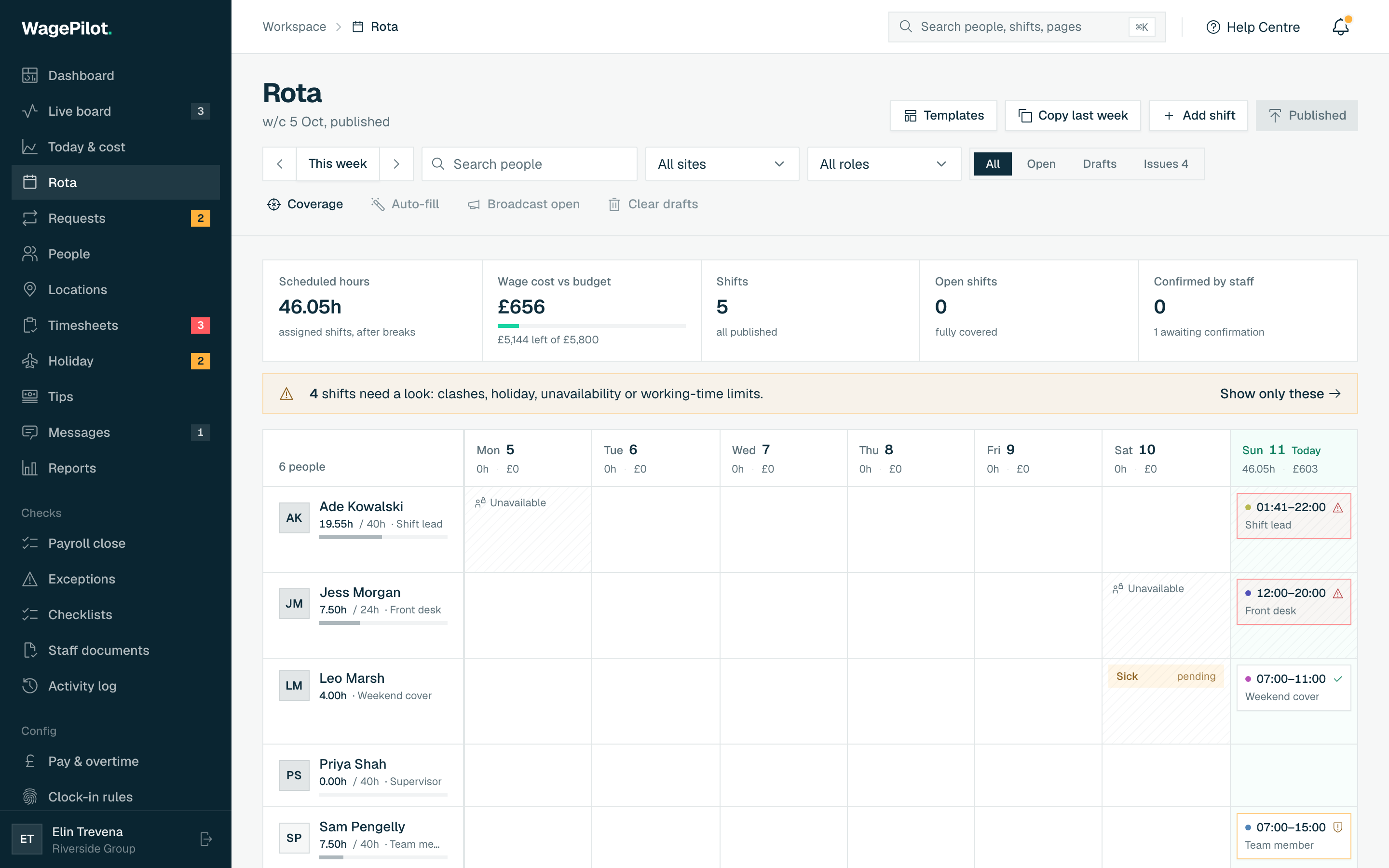
Rota builder
Build the week on a simple grid. Copy last week as a starting point, drag in shifts, and publish: staff are notified instantly on their phones. Conflict warnings flag double-bookings and clashes with approved holiday before anyone turns up to an empty rota.
- Copy-last-week and templates for fast scheduling
- Conflict & holiday-clash warnings before you publish
- Instant publish: staff see their shifts on their phone
- Nobody is rostered after their leaving date
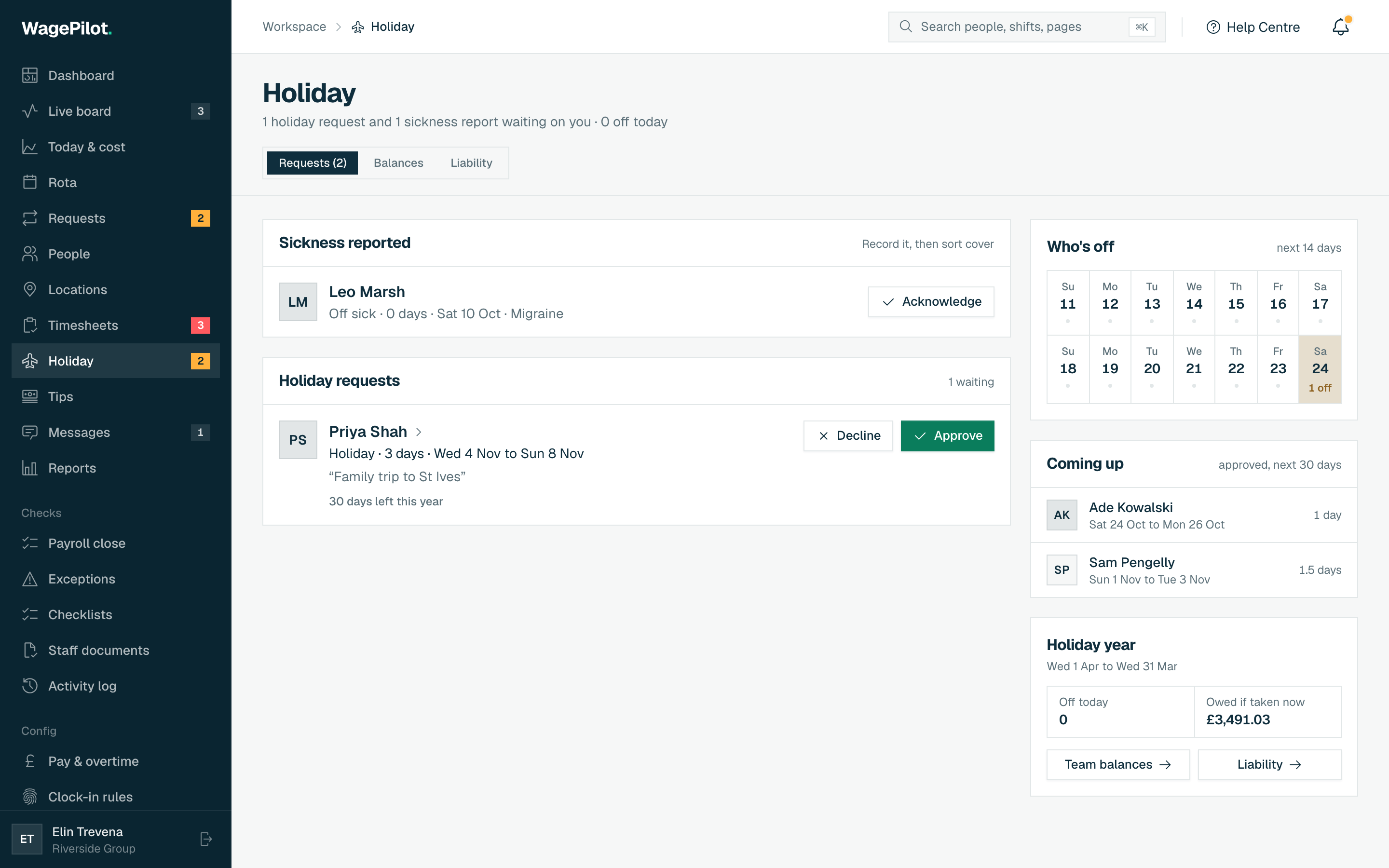
Holiday and leave
Staff see their remaining balance and request leave in a couple of taps. You approve or decline from a single inbox that warns you about rota clashes. Accrual is calculated automatically, including the 12.07% rule for irregular-hours and part-year workers, so part-time and zero-hours holiday stops being a spreadsheet.
- Automatic accrual, including 12.07% for irregular hours
- One approval inbox with rota-clash warnings
- Bank holidays and pro-rata balances handled for you
Audited timesheets
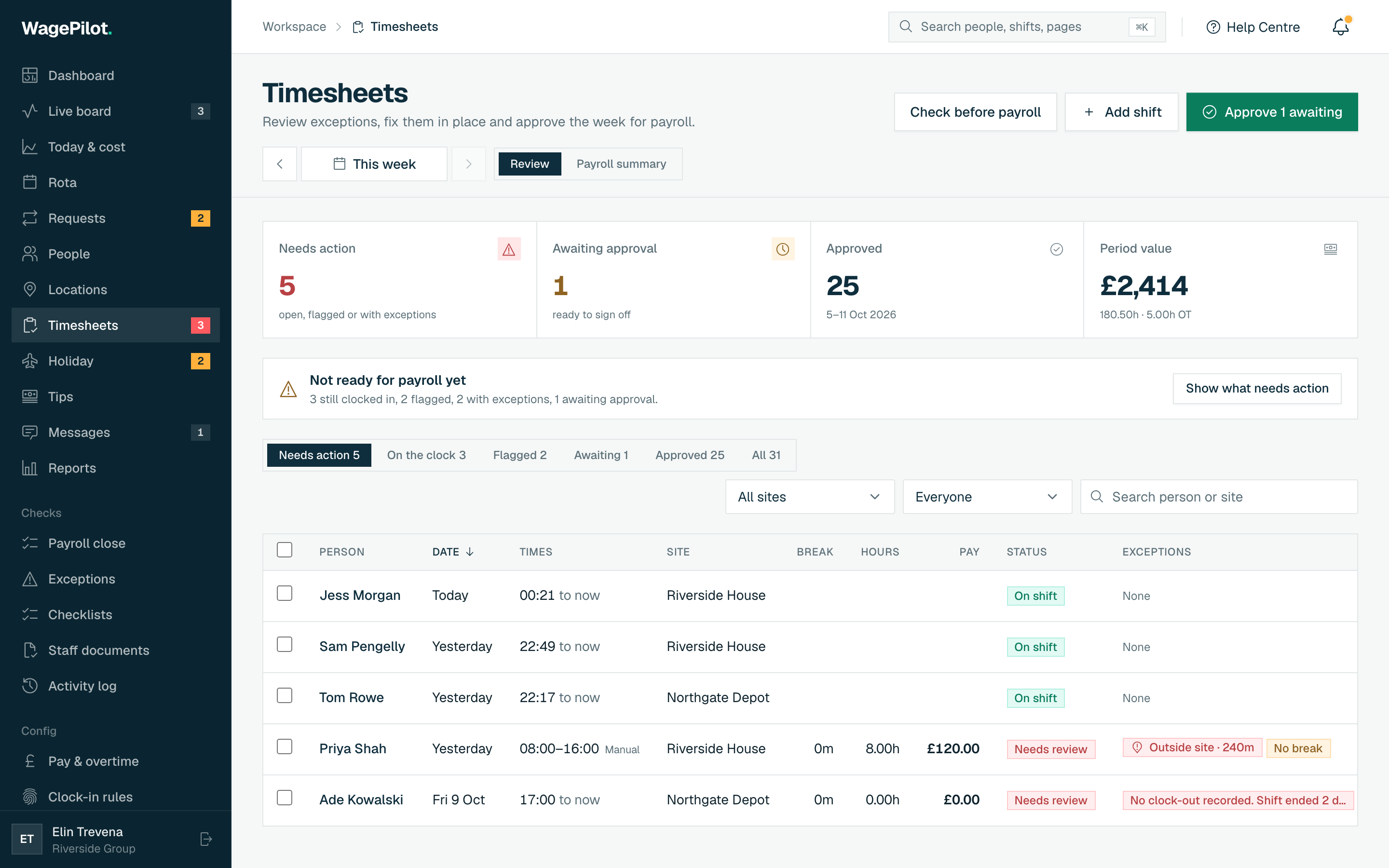
Every week lands as a clean timesheet to review, flag and approve. Every edit requires a reason and is logged in a tamper-evident history that staff can see too. When a shift is disputed, or HMRC asks, you have an exportable paper trail instead of an argument.
- Tamper-evident edit history, every change with a reason
- Staff can see their own logged hours and edits
- Minimum-wage checks with the workings shown, including accommodation offset, uniform, tools and meal deductions, age bands and apprentice-rate expiry
- Built to help with UK record-keeping duties (NMW, Working Time)
- Flags breaches of school-age and under-18 working limits, with work permits tracked
- Records kept for the retention period, with an HMRC and ACAS evidence pack and a full records archive
- Staff correction requests: a proposed time, a reason, the pay impact, your decision, all logged
- Exceptions in one place: late, no-shows, short breaks, short rest gaps, 48-hour average and under-18 limits
- Staff documents with right-to-work expiry tracking: staff upload from their phone, you approve
- An activity log of every change, by whom and when
CSV export to payroll
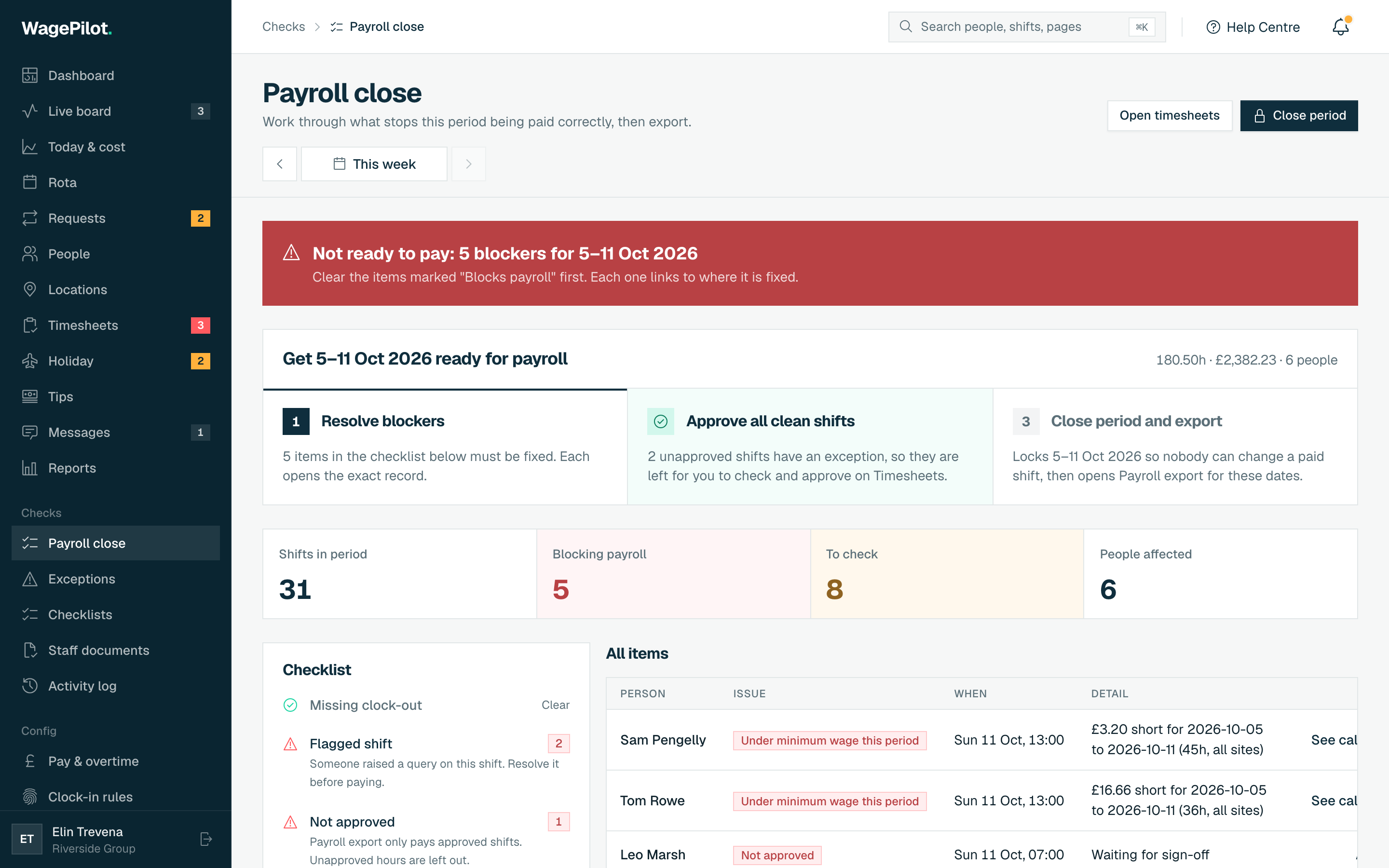
WagePilot is not a payroll bureau, and that is deliberate. Approve a clean week and export the hours as a CSV that drops straight into the payroll you already run: Xero, Sage, BrightPay, QuickBooks and others. You keep your payroll setup; we just hand it clean, approved hours.
- Guided Payroll close: blockers listed with a fix, clean shifts approved in one click
- Closed weeks are locked: changing one needs a logged reason to reopen
- Leavers: untaken holiday estimated under the Working Time Regulations and added to the export
- One-click CSV export of approved hours
- Sleep-in shifts: a flat allowance, with only time woken to work counted towards the minimum wage, in their own export columns
- Premium days such as Christmas Eve, paid at the rate you set
- Works alongside Xero, Sage, BrightPay & QuickBooks
- Pre-payroll, not payroll: exact hours and estimated gross pay (before tax, NI and pension) for your payroll software or accountant
More ways WagePilot works for you
The numbers that don't move when you grow
Every capability ships from your free first site. A bigger plan only ever means more sites: never a premium tier holding the good bits hostage, and never a charge per head.
£29
Per site, per month
One flat price per venue, never a charge per head, your first site free forever.
£0
Per extra hire
We never bill per seat, so taking on a Saturday assistant never moves the software bill.
12.07%
Accrual, automatic
Irregular-hours and part-year holiday works itself out: no spreadsheet, no maths.
1-click
Hours to payroll
Approve a clean week and export it as a CSV for the payroll you already run.
You are never charged per head, so this list never shrinks when you hire.
Everything's included. On every plan.
There's no premium tier dangling the good bits. A higher plan only ever means more sites: every capability below is in the box from your free first site onward.
Time & attendance
- Geofenced clock-in, checked only at clock-in
- QR-code clock-in by the till, geofenced too
- Kiosk mode on a tablet you already own (every plan)
- Open clock-in mode, no rota required
- Daily & weekly overtime
- Paid & unpaid breaks
Rota & cover
- Drag-and-drop week builder
- Copy last week & templates
- Conflict & holiday-clash warnings
- Shift swaps & cover requests
- Open shifts staff can claim
- Instant publish to phones
Pay & cost control
- Live labour-cost board
- Per-site & all-site cost view
- Projected day total vs budget
- Per-person live earnings
- Tips & tronc pooled and shared fairly (Core and up)
- CSV export to Xero, Sage, BrightPay & QuickBooks
Holiday & compliance
- Automatic accrual, incl. 12.07%
- One approval inbox with clash warnings
- Bank holidays & pro-rata balances
- Tamper-evident timesheet audit trail
- Built for UK NMW & Working Time records
Team, multi-site & data
- Unlimited staff on every plan
- Multiple sites, one owner board
- Team messages, next to the rota (Core and up)
- Your branding on the staff app (Pro and up)
- GDPR data export & delete
- Installs as a phone app, no app store
- Secure billing by Stripe
One flat price per site. You are never charged per head, so this list never shrinks when you hire.
See the flat pricingKeep your payroll. We just hand it clean hours.
WagePilot tracks time and works out overtime, breaks and holiday, then exports approved hours as a CSV that drops into the payroll you already run. No two-way sync, no migration, no pay run on our side, by design.
CSV export, one click-
Xero
Drop approved hours into Xero Payroll.
-
Sage
Export pay-ready timesheets to Sage Payroll.
-
BrightPay
Send approved hours to BrightPay.
-
QuickBooks
Export approved hours to QuickBooks payroll.
Any payroll that accepts a CSV of hours works too.
What we deliberately leave out
What WagePilot leaves out on purpose, and why.
We don't run your payroll
We export approved hours as a CSV that drops into Xero, Sage, BrightPay or QuickBooks. You keep the payroll you trust; we just hand it clean numbers. No two-way sync, no pay run on our side, by design.
We don't bill per seat
No plan charges per head, and no paid plan caps sites or staff. A flat £29 a month per site on Core, or run one small site free forever. Hiring never moves the bill.
We don't track location all day
Location is checked once, at clock-in or out. Never continuously, never in the background.
We don't sell you hardware
No tablets, no terminals, nothing to buy. Staff use the phone already in their pocket, with geofenced GPS or a printed QR code on every plan, and if you want one clock on the counter, Kiosk mode runs on a tablet you already own, on every plan.
More on how we handle your data on the privacy & security page.
Questions about what WagePilot does
The product scope, in plain terms.
Does WagePilot run payroll?
What size and type of business is WagePilot for?
Is the “live earnings” figure the same as take-home pay?
Read every question , or see pricing for the cost details.
Start running shifts on autopilot
Set up your first site this afternoon and watch the first shift tick up live. Free to start, never per head, flat per site as you grow.
Free for one site, up to 3 staff · no card to start · cancel anytime