
Payroll close: the weekly run
A guided run for each pay period: clear what blocks payroll, approve clean shifts, close and export. Owners can override with a logged reason.
Payroll close shows everything that stops a pay period being paid correctly, and walks you through finishing it in three steps. Pick the period with the stepper at the top; every figure on the page follows it.
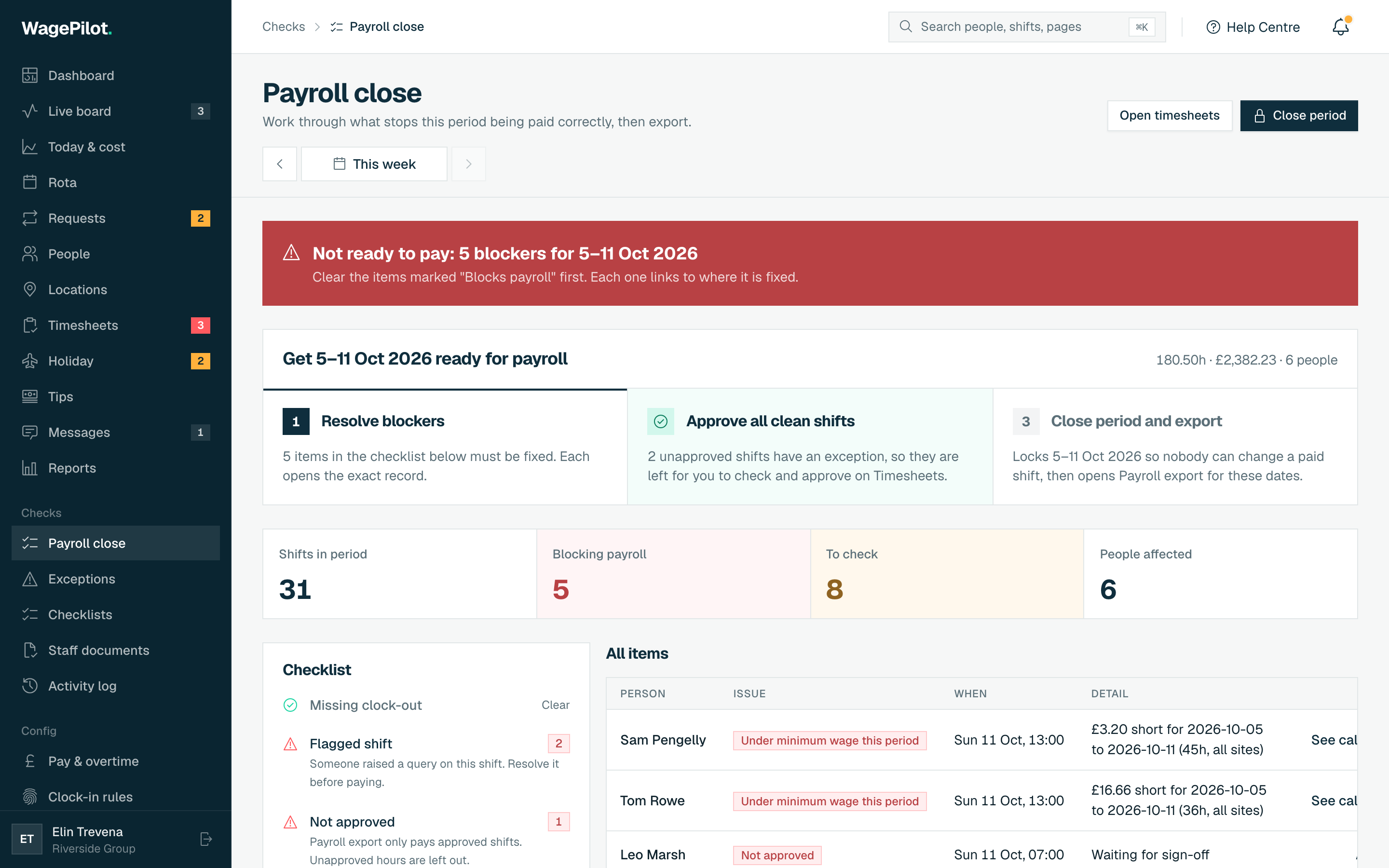
The three steps
-
01
Resolve blockers
Items that block payroll (a missing clock-out, a shift not approved, a flagged shift, a rate below the minimum wage, no pay rate, a sleep-in not approved) are listed in the checklist. Each has a fix link to the exact record. When none are left the step reads Nothing left that blocks payroll.
-
02
Approve all clean shifts
Approves every finished shift and rota sleep-in in the period that has no exception, in one action. Shifts with an exception are left for you to check on Timesheets.
-
03
Close period and export
Closes and locks the period so nobody can change a paid shift. Add an optional note, for example "Sent to BrightPay". Once closed, Export for your payroll opens Payroll export for the same dates.
Around the steps
- Tiles
- Shifts in period, Blocking payroll, To check and People affected.
- Checklist
- Every kind of issue with its count. Tap one to focus the list on it, or Show all.
- Issue list
- Person, issue (marked Blocks payroll, Check or Note), when, detail and a fix link.
Who can close a period
Owners and managers can close a period once nothing blocks payroll. If you have to pay on time with an issue still open (for example a disputed shift you are paying as recorded), only the account owner can close anyway: Close period opens Close with open issues, lists the open issues, and asks for a Reason for closing with open issues of at least 10 characters. The reason is kept with the closed period.
Closed periods are locked
Once a period is closed, finished shifts in it cannot be changed. To make a correction, reopen the period with Reopen period and give a Reason for reopening. Every close and reopen is kept under Closed periods, with who did it and why.